Bing crawl budget: what it is and how to reduce wasted crawling
Last updated: October 13, 2026
Quick answer: Bing crawl budget is the amount of attention Bingbot is willing to spend on your site, and on larger sites the most useful fix is usually to reduce duplicate, low-value, parameter-heavy, and broken URLs rather than trying to “increase” crawling. For a practical starting point, audit at least 30 days of logs, then cut the worst waste first.
Key Takeaways
- Small, tidy sites usually do not need aggressive crawl management.
- Bing tends to favor pages that are important, fresh, and well linked internally.
- Logs showing repeated hits to removed, blocked, canonicalized, or never-linked URLs point to crawl waste.
- Duplicate URLs, parameter sprawl, and weak internal linking typically burn more crawl budget than almost anything else.
If Bing is spending time on junk pages, new or updated pages wait longer to be discovered and refreshed. The fix is usually not “crawl more.” It is “make fewer bad URLs worth crawling.”
What Bing crawl budget actually means
Bing crawl budget is the practical limit on how much Bingbot crawls your site in a given period, and it is shaped by your site’s size, speed, quality, and perceived usefulness. If your site is small and tidy, Bing can usually keep up without drama. If your site has millions of URLs, search filters, faceted navigation, or endless parameter combinations, Bing starts making trade-offs. For background on crawling and indexing behavior, see Bing Webmaster Guidelines and Google Search Central on crawl budget, which explains the same core trade-off clearly.
The phrase sounds technical, but the underlying idea is straightforward: if Bing has a limited number of useful fetches and many of them go to duplicates, near-duplicates, or dead ends, fewer requests are left for pages that matter.
That is why crawl budget matters more to some sites than others. If you run a 50-page brochure site, crawl budget is rarely your bottleneck. If you run an e-commerce catalogue with color, size, sort order, and tracking parameters, it can become the first thing that slows discovery.
The key mistake is treating crawl budget as an SEO score to “increase.” I would not start there. I would first ask whether Bing is being forced to waste crawl requests on URLs that should never have been exposed in the first place; if the issue is large or persistent, it is worth reviewing with an experienced technical SEO or development professional.
| Situation | Best Path | Why Other Options Fail |
|---|---|---|
| Small site, under 500 URLs | Fix obvious duplication and dead links | Aggressive crawl controls are usually overkill |
| Large site, 10,000+ URLs | Cut parameter waste and tighten internal links | Asking Bingbot to crawl harder just burns the same budget faster |
| E-commerce with filters | Block or canonicalize low-value filter combinations | Leaving every combination indexable creates endless near-duplicates |
| News or frequently updated site | Prioritize fresh, linked pages | Sitemaps alone do not compensate for poor internal linking |
Quick check: if your site has many more URLs than pages a human would ever want to visit, you are probably dealing with crawl waste, not crawl scarcity.
How Bing decides what to crawl first
Bing usually crawls pages that look important, change often, or are strongly connected by internal links. If your homepage links to a page, and that page links to another page, Bing gets a signal that those pages matter. If a URL only appears in a filter state, a search results page, or a weak sidebar, it often looks disposable. The same pattern shows up in Bing’s own guidance on site architecture and in Google’s advice on internal linking and crawl paths.
There are three things that tend to matter most in practice:
- Discoverability. Bingbot has to find the URL.
- Priority. Bing has to think the URL deserves attention.
- Capacity. Bing has to decide whether the site is worth frequent revisits.
If you make 5,000 URLs easy to discover but 4,500 of them are thin, Bing will usually spend a lot of time sorting through low-value pages. If you make the right 500 URLs easy to find and leave the rest buried or blocked, the bot’s path gets cleaner fast.
This is why “just add a sitemap” is weak advice on its own. A sitemap helps Bing discover URLs, but it does not tell Bing which ones are valuable enough to justify repeated crawling. A sitemap full of junk can even confirm the wrong priorities.
If your pages change often, Bing will also revisit pages more often when it sees fresh signals. A page updated weekly and linked from important pages is much more likely to be revisited than a page last touched in 2021 and buried six clicks deep.
A practical rule: if a URL would annoy a human visitor because it adds no unique value, it is probably a poor use of crawl capacity too.
Quick check: if your important pages are hard to reach in the site architecture, Bing is likely crawling around them instead of through them.
How do I know Bing is wasting crawl budget?
Bing is wasting crawl budget when logs show repeated crawling of URLs that should have been removed, blocked, canonicalized, or never linked in the first place. That is the diagnosis I would start with, because guesswork is a bad substitute for server logs.
You do not need a fancy platform to begin. A basic log file export plus Bing Webmaster Tools is enough to spot the pattern. Look for repeated hits to URLs with tracking strings, sort parameters, internal search results, old pagination endpoints, or versioned duplicates.
If you have a large site, I would check these signs in this order:
- Export server logs for at least 30 days if you can; 7 days is the minimum useful slice.
- Filter Bingbot user agent hits and sort by URL path.
- Count how many requests land on URLs with parameters such as
?sort=,?page=, or campaign tags. - Compare those URLs to your XML sitemap and top internal links.
- Identify pages that return 404, soft 404, redirect chains, or content that duplicates another page almost word for word.
A second signal is poor crawl efficiency in Bing Webmaster Tools. If Bing keeps revisiting old, thin, or broken URLs while slow to pick up changes on important pages, that is not random. It usually means the site gives Bing too many cheap places to go and not enough clear signals about where to spend time.
Do not overread one bad week. Crawling can swing with content updates, seasonality, or a site migration. I would look for a persistent pattern across several weeks, not one spike.
Quick check: if your logs show Bingbot repeatedly hitting URLs no human would bookmark, your crawl budget problem is probably real.
The 3 conditions that waste Bing crawl budget fastest
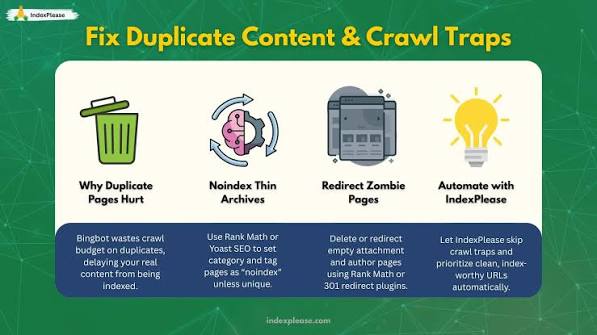
If you want the shortest useful answer, it is this: duplicate URLs, parameter sprawl, and weak internal linking waste more crawl budget than almost anything else.
If the same content appears at multiple URLs, Bing must decide which version matters. That happens with trailing slashes, http/https, www/non-www, uppercase/lowercase variations, printer-friendly pages, and session IDs. One page becomes five, then fifty.
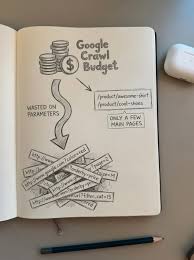
If your site uses filters, sorting, search results, or tracking parameters, every click can generate another crawlable URL. A product category with size, color, price, brand, and sort combinations can explode into thousands of low-value states. Bingbot does not know which of those states matter unless you make the choice obvious.
If important pages are buried behind weak navigation, Bing spends more time on orphan pages and less on the pages that move the business. A page that is only reachable from an XML sitemap is not invisible, but it is usually not getting the same priority as a page linked from core navigation and strong contextual links.
The remedy is not the same for each condition:
- For duplicates, use canonicals, redirects, and one clean preferred version.
- For parameter sprawl, reduce crawlable combinations and block the worst patterns where appropriate.
- For weak linking, flatten the structure and add direct paths to important pages.
The wrong move is to throw every possible control at the site at once. That can create accidental noindexing, blocked resources, or broken discovery paths. I would change one layer at a time and recheck logs.
Quick check: if you can point to one of those three problems instantly, that is probably your main leak.
What to do if your site has filters, search pages, or parameters
If your site generates lots of URL variations, then your first job is to prevent low-value combinations from becoming crawl traps. This is the most common crawl-budget problem I see in practice because the URL space grows faster than the content team can control it.
For parameter sprawl, start with the worst offenders: internal site search results, sort orders, session parameters, campaign tags, and filter combinations that produce pages nobody would search for. A search URL like /search?q=blue+shoes is usually not a page you want Bingbot to spend much time on. The same goes for endless parameter strings that only reorder the same product grid.
A sensible path looks like this:
- List every parameter your site generates, including filters, sorting, search terms, and tracking tags.
- Mark each one as indexable, crawlable-but-not-indexable, or dead-end.
- Keep only the combinations that produce genuinely useful landing pages.
- Use canonical tags to point duplicates to the preferred URL when the content is materially the same.
- Apply robots directives or URL parameter handling only after you are certain the pages are not needed for discovery.
- Remove internal links to pointless parameter states so Bingbot stops finding them through normal browsing paths.
Two cautions matter here. First, canonical tags are a hint, not a magic eraser. Bing can ignore them if the signals conflict. Second, blocking crawl with robots.txt does not remove a URL from the web; it just prevents crawling. If a blocked URL is already indexed elsewhere, you may need a different cleanup path.
For e-commerce, I would usually keep one crawlable path for major categories and selected high-demand filter pages, but not every combination. A site that sells running shoes might keep “men’s running shoes” and maybe “women’s trail running shoes” as valuable landing pages, while blocking endless combinations like color plus size plus sort plus sale state.
Quick check: if your parameter list reads like a spreadsheet column explosion, this is your main project.
What to do if important pages are slow to show up in Bing
If your new or updated pages are slow to appear, then your problem is often not raw crawl volume but priority signals. Bingbot is spending time on the wrong pages because your site does not make the right ones easy enough to find. Bing’s indexing guidance and common SEO practice both point to the same fix: give important URLs a clearer path.
I would start with the pages that matter commercially or editorially, then force a clearer path to them. Strong internal links from the homepage, top categories, and related content matter more than many site owners realize. A page linked from three important pages is usually in a better position than a page buried in a sitemap and nowhere else. If you need a practical benchmark, look at Bing Webmaster Tools alongside your logs and sitemap coverage.
Use this sequence:
- Identify the 20 to 50 pages that matter most right now.
- Link to them from relevant high-authority pages, not just from footers or XML sitemaps.
- Remove or merge thin pages that compete with those pages for internal links.
- Make sure each important page has a self-referential canonical tag and a clean, permanent URL.
- Update the XML sitemap so it only contains URLs you actually want Bing to spend time on.
- Resubmit the sitemap in Bing Webmaster Tools after major changes.
Bing Webmaster Tools can help with submission and diagnostics, but it will not rescue a site whose internal structure points everywhere at once. If your own site architecture says every page is equally important, Bing has no reason to disagree.
I would also watch page freshness. If a page changes daily, the change should be easy for Bingbot to detect. If the page changes once a year, do not expect frequent revisits just because you asked.
Quick check: if your best pages are hidden behind generic category pages and endless pagination, priority is your real issue.
Edge cases where the usual advice breaks down
If any of these scenarios fits, the standard “block more stuff” advice can make things worse.
- Migration or redesign: what changes is URL instability; what to do instead is preserve old-to-new redirects, keep the sitemap clean, and avoid blocking the old URLs until the redirect map is stable.
- News or time-sensitive publishing: what changes is freshness demand; what to do instead is strengthen internal links to new stories and keep recrawl-friendly paths short.
- Very small sites, under about 100 pages: what changes is that crawl waste is rarely the bottleneck; what to do instead is fix obvious duplicates and broken links, not overengineer directives.
- Sites with lots of user-generated pages: what changes is quality variation; what to do instead is quarantine thin or spammy pages and keep low-value profiles out of normal navigation.
- International sites with language or regional versions: what changes is duplication risk across locales; what to do instead is use correct hreflang and clean canonical relationships so Bing can tell variants apart.
- JavaScript-heavy sites: what changes is discoverability timing; what to do instead is ensure core links and content are available without relying on fragile client-side states, or Bing may crawl less efficiently than you expect.
The general rule still holds: if a URL does not deserve repeated attention, make that obvious. But in these edge cases, a blunt block can remove the very signals Bing needs to understand the site.
Quick check: if your site recently changed architecture, publishes fast-moving content, or has locale variants, do not copy-paste generic crawl advice.
A practical cleanup order I would use
If your site is leaking crawl budget, I would clean it in this order because it fixes the biggest waste first. This is not glamorous work, but it is how you get control back.
-
Audit logs for Bingbot
- Look at at least 30 days if you have it.
- Sort by URLs that receive the most Bingbot requests.
- Find parameter-heavy, duplicate, and broken URLs.
-
Trim the URL surface
- Remove internal links to junk states.
- Stop generating useless filter or search URLs.
- Merge duplicate content into a single preferred URL.
-
Set canonical and redirect rules
- Redirect old or duplicate versions where permanent consolidation makes sense.
- Canonicalize pages that are close variants but still need to exist.
-
Clean the XML sitemap
- Keep only URLs you actually want crawled.
- Remove redirected, noindexed, duplicate, and thin pages.
-
Strengthen internal links
- Put important pages closer to the homepage and core category paths.
- Link them from related content, not just from navigation chrome.
- Remove dead-end links that send Bingbot in circles.
-
Recheck Bingbot logs
- Compare the next 2 to 4 weeks against your baseline.
- Confirm that wasted requests decline and important URLs appear more often.
If the cleanup worked, Bing should spend less time on junk and more time on the URLs you actually want discovered, refreshed, and indexed.
Drafted with AI; not yet reviewed by a person.

Related Posts

How to Tell Whether Bing Has Discovered a New Page

Bing indexing and crawl troubleshooting: The Complete Guide